UPS OAuth 2.0 API

UPS has retired the old access key model for UPS APIs. New integrations should use UPS OAuth 2.0 credentials with the current JSON/OpenAPI based APIs. If your shipping rates still depend on a legacy UPS Developer Kit access key, update the connection before the next production change or credential rotation.
In this guide, we'll show you how to obtain access to the UPS OAuth 2.0 API. The OAuth credentials you'll need are the Client ID and Client Secret.
First, go to the UPS Developer website and click Create Application. If you don't have an account already, you will need to create one.
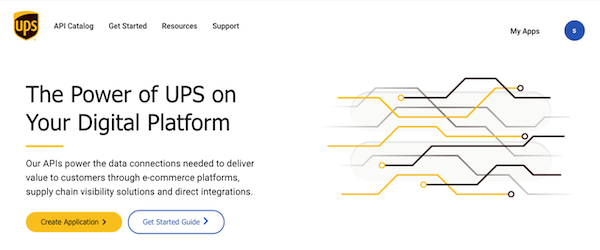
The application name can be anything. We recommend using the name "solvingmaze" for record keeping. Next, you will be asked to describe your use case:
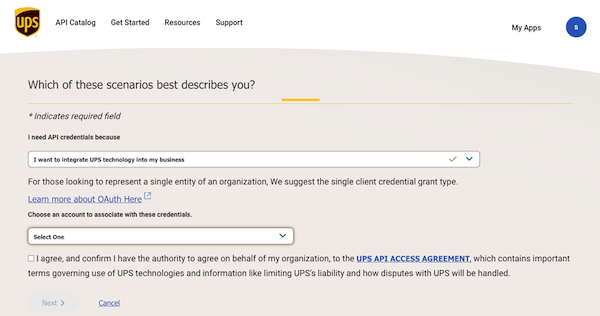
Select "I want to integrate UPS technology into my business" and your UPS account number. On the next form, fill out your contact information.
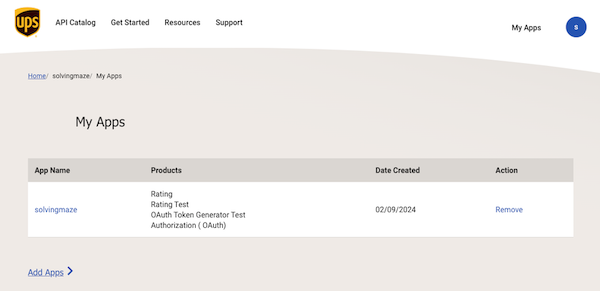
The API products you will need are OAuth and Rating. The Rating API is for obtaining live shipping rates from UPS:
Once you have your UPS OAuth credentials (Client ID and Client Secret), you can use SolvingMaze to help you estimate postage by factoring in box sizes and packaging costs by selecting UPS OpenAPI for Shipping Rates API in your SolvingMaze menu.
Ready to try SolvingMaze? Create Free Sandbox Warehouse and test packing and quoting, batch picking, and layout simulation before production.
 Previous Article