Pick-to-Cart vs Pick-to-Box in Batch Picking

Batch picking reduces warehouse travel by letting a picker collect items for multiple orders in one trip. That efficiency creates a second problem: the picked items still need to stay organized by order, carton, or packing destination. If order separation is weak, the time saved during picking can be lost again at the packing station.
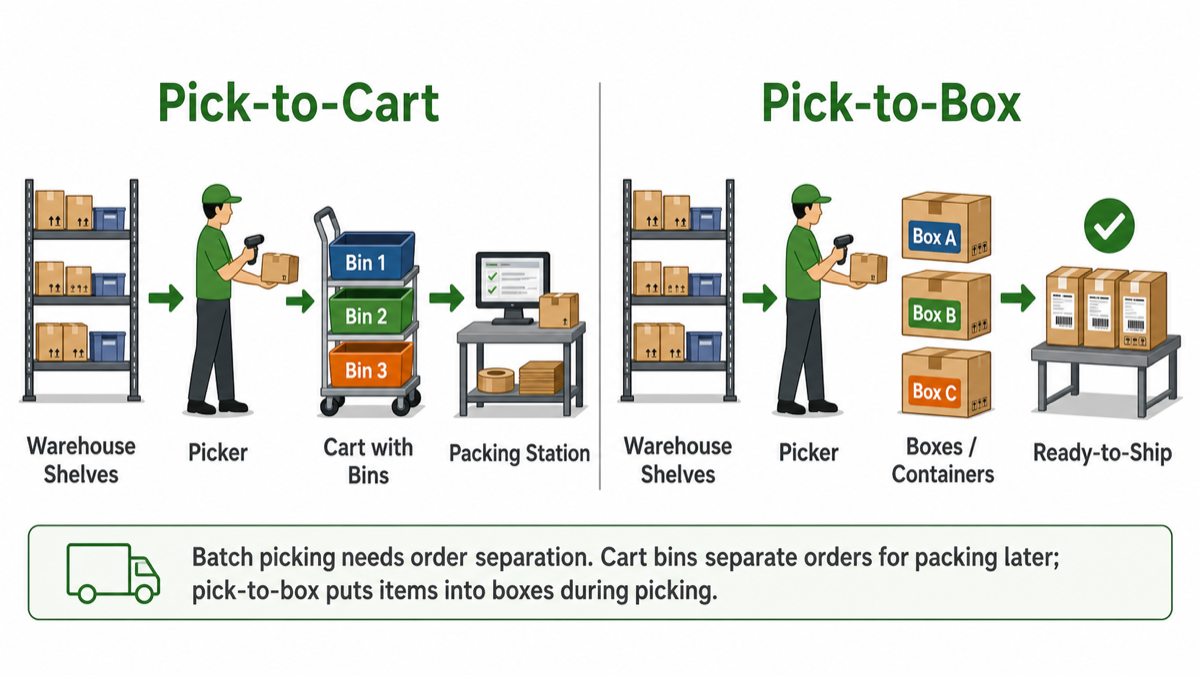
Two common ways to keep batch-picked orders organized are pick-to-cart and pick-to-box. Both workflows help the picker place each item into the right destination while the pick is happening. The difference is how much of the packing decision has already been made.
What is pick-to-cart?
Pick-to-cart, also called pick-to-bin or cart-bin picking, assigns picked quantities to a cart bin, tote, or slot while the picker moves through the warehouse. A bin can represent an order, part of an order, or another work grouping, and an order can span multiple cart bins when needed. The picker follows the optimized route, confirms the item when barcode data is available, picks the required quantity, and places the item into the assigned bin instead of mixing all picked items together.
This approach works well when the warehouse wants the walking efficiency of batch picking but still plans to make packing decisions later. The packing team receives separated bins or totes, then chooses the correct shipping boxes, verifies the order, and completes packing at the station.
What is pick-to-box?
Pick-to-box takes the separation step further. Instead of sending the picker only to a cart bin or tote, the workflow can direct the picker to the specific box or container that the item belongs in. Items are picked directly into the shipping box or container, so when the box is filled it is much closer to ship-ready.
In SolvingMaze, pick-to-box is useful when Pack and Quote output is combined with online Batch Pick. The packing output identifies the box or container assignment, and the picking workflow can use that information to speed fulfillment by reducing sorting, repacking, and handoff work before final checks, sealing, labeling, and shipment.
When pick-to-cart is a good fit
Pick-to-cart is often the simpler starting point for batch picking. It keeps orders separated without requiring final packaging decisions before the pick starts. That makes it practical for teams that still need packers to inspect items, choose cartons, add inserts, handle exceptions, or combine items at the packing station.
- Use pick-to-cart when cart bins, totes, or slots can identify the correct order or order portion clearly.
- Use it when packing decisions are made after the items arrive at the packing station.
- Use it when barcode confirmation should verify the item before the picked quantity is placed into its assigned bin.
- Use it when the team wants faster picking with less order mix-up, but does not need box-level assignment during the pick.
- Use it when warehouse staff are moving from paper pick lists to guided batch picking in stages.
When pick-to-box is a good fit
Pick-to-box is a better fit when the warehouse can decide the box or container assignment early and wants to move faster from picking to shipping. This is especially useful when order volume is high, packing work is a bottleneck, or the same batch contains many similar items that are easy to mix up after picking.
- Use pick-to-box when packing output is already available before picking begins.
- Use it when items should be picked directly into boxes or containers instead of sorted later at packing.
- Use it when filled boxes should move quickly to final checks, sealing, labeling, and shipment.
- Use it when one order may have multiple boxes or containers and the picker needs clearer destination guidance.
- Use it when barcode confirmation, box assignment, and packing output can work together to reduce picking and packing errors.
How SolvingMaze supports both workflows
SolvingMaze Batch Pick starts with order lines, item locations, cart capacity, and the warehouse layout. It groups orders into efficient batches and creates route-aware picking work so pickers walk less. For cart-bin picking, the picker can be guided to the right cart bin for each picked quantity and can use barcode confirmation to verify the item. For pick-to-box workflows, online Batch Pick can use packing output so picked quantities are directed into the right box or container.
The best workflow depends on how mature the picking and packing process is. Many warehouses start with pick-to-cart because it is easier to adopt and still protects order separation. Pick-to-box becomes more valuable when the packing decision is available earlier and the operation wants filled boxes to move toward shipping with fewer touches.
If your warehouse is still using paper pick lists, start by improving the batch and cart-bin workflow. If you already use packing software to choose boxes and containers, pick-to-box can help connect the picking and packing steps more tightly. Either way, the goal is the same: reduce picker travel without creating avoidable sorting work later.
 Previous Article