Warehouse Batch Pick Software and API
Upload order CSV files, create pick jobs, guide pickers through browser task pages, support pick-to-box workflows, and monitor progress without custom integration.
Submit orders from your WMS, ERP, shopping cart, or fulfillment system and retrieve optimized batches, routes, pick tasks, and cart-bin assignments programmatically.
From Manual Lists to Guided Picking
SolvingMaze helps warehouse teams plan picking around the actual warehouse layout, item locations, cart bins, and packing requirements. Teams can start with CSV uploads in the online tool or connect an existing WMS, ERP, shopping cart, or fulfillment system through the API.
Picking Strategies Supported
SolvingMaze Batch Pick supports several warehouse picking workflows. Teams can optimize pick batches, organize work by zone, run wave-style picking, and guide pickers to the right cart bin, box, or container depending on how orders, carts, packing, and warehouse layout are configured.
- Pick-to-order: optimize picking for individual customer orders.
- Batch picking: group multiple orders into efficient pick batches.
- Zone picking: organize work by warehouse zone so pickers focus on assigned areas.
- Wave-style picking: create pick jobs for a fulfillment run or group of orders.
- Pick-to-cart / cart-bin picking: guide picked items into the right cart bins.
- Pick-to-box: combine optimized picking with packing output so picked quantities can be placed directly into specific boxes or containers.
How Batch Pick Works
Warehouse Layout-Aware Route Optimization
SolvingMaze Batch Pick uses your warehouse model to understand how pickers move through racks, aisles, zones, and depot locations. That makes route planning more practical than simple order sorting.


From Optimized Routes to Guided Picking
- Layout-aware optimization: plan pick routes around your actual warehouse layout, zones, aisles, depots, and item locations.
- Flexible picking workflows: support batch, zone, wave-style, and pick-to-cart or cart-bin operations through Batch Pick API, with pick-to-box workflows available when packing output is included.
- Picking connected to packing: the online tool uses Pack and Quote API with Batch Pick API to guide picked items into the right cart bin, box, or container and reduce handoff errors.
- Barcode-assisted accuracy: help pickers confirm the right item before updating picked quantity.
- Quantity-based progress: monitor partial progress of pick task status.
- Online tool and API paths: use the online tool for CSV-based job management and pick-to-box workflows, or use the Batch Pick API for system-to-system pick optimization.
- Less wasted resources: reduce unnecessary travel, printed pick lists, and correction work caused by picking mistakes.
Picker and Manager Workflows
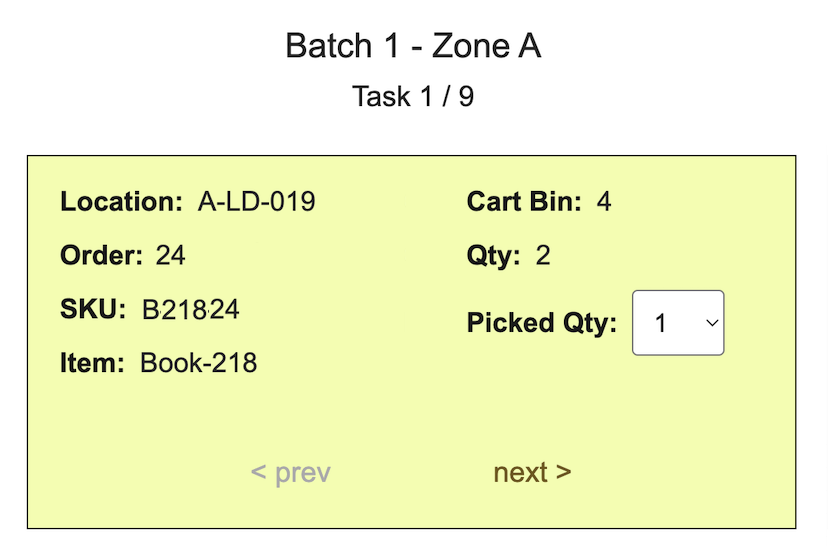
Pickers get clear task instructions on what to pick, where to pick it, how much to pick, and where to place it. Barcode scanning and picked-quantity updates help reduce errors while keeping progress current.
Warehouse managers can create pick jobs from CSV uploads, choose batch and packing options, and monitor job status and picking progress. For pick-to-box workflows, box and order views help teams see what has been picked and what still needs attention.
Online Tool or Batch Pick API
The online Batch Pick tool is for warehouse teams working in a browser: upload an order CSV file, create a pick job, choose job options, review job status, and use the picker workflow. For pick-to-box jobs, the online tool combines Batch Pick API with Pack and Quote API.
The Batch Pick API is for software integration: submit order data as a REST request, check request status, and retrieve optimized pick batches, routes, tasks, and cart-bin output from your own WMS, ERP, shopping cart, or custom fulfillment system. Integrations that need pick-to-box can combine it with Pack and Quote API packing output.
To improve day-to-day pick performance before work starts, try Warehouse Layout Simulation to evaluate layout and item storage choices.

Features Included
 Pick Route Optimization
 Error-Reducing Task Guidance
 Online Batch Pick Tool
 Barcode Scanning
 Pick-to-Cart and Pick-to-Box
 Batch Pick API
 Quantity-Based Progress
 Flexible Pricing
Frequently Asked Questions
What picking strategies does SolvingMaze Batch Pick support?
SolvingMaze Batch Pick supports pick-to-order, batch picking, zone picking, wave-style picking, pick-to-cart, cart-bin picking, and pick-to-box workflows depending on how orders, carts, packing, and warehouse layout are configured.
What is pick-to-box?
Pick-to-box tells pickers which box or container each picked quantity belongs in, reducing the handoff gap between picking and packing. In SolvingMaze, pick-to-box uses Batch Pick API together with Pack and Quote API packing output.
Does SolvingMaze Batch Pick support barcode scanning?
Yes. Picker task pages can scan expected item barcodes and update picked quantity as work progresses.
How does SolvingMaze Batch Pick help reduce picking errors?
Picker task pages show the item location, order, SKU, item name, required quantity, and cart bin or destination container. Barcode scanning helps confirm the expected item before picked quantity is updated.
Can I use Batch Pick without API integration?
Yes. The online Batch Pick tool lets warehouse users upload order CSV files and create pick jobs from the browser.
Do I need to replace my WMS or ERP?
No. Teams can use the online Batch Pick tool with CSV uploads, or connect SolvingMaze to an existing WMS, ERP, shopping cart, or custom fulfillment system through the API.
What setup is required?
SolvingMaze needs a warehouse layout and item locations so it can plan practical pick routes. Online users can model the layout and upload orders by CSV; integrations can submit order and location data through the API.
When should I use the Batch Pick API?
Use the Batch Pick API when you want your WMS, ERP, shopping cart, or custom system to submit order data and retrieve optimized pick batches, routes, tasks, and cart-bin output programmatically. Combine it with Pack and Quote API when your integration needs pick-to-box.
SolvingMaze Ltd, Company No. 11016672, Copyright © 2026